
-
If you wish to purchase a license for a product, please register and then send a message to Stuart Wright to request access to purchase. Please include the URL of the forum you wish to use the product on.
Tag Essentials 2.6.8
- Seller m2n
- Creation date
Adds key features to make tags better both in threads and in the XFRM resource manager

-
 edit-tag.jpg
 -
 admin-tag-management.jpg
 -
 blacklisted-tags.jpg
 -
 edit-wiki.jpg
 -
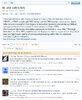 tag-page.jpg
 -
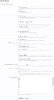 admin-options.jpg
 -
 alert-received.jpg
 -
 email-alert-received.jpg
 -
 watch-tag.jpg
 -
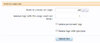 prune-low-usage.jpg
 -
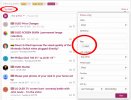 tag-filters.jpg
 -
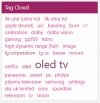 forum-specific-tag-cloud.jpg
 -
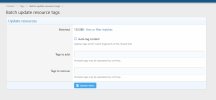 batch-update-resources.jpg
 -
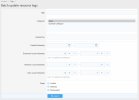 batch-update-resources-filter.jpg
 -
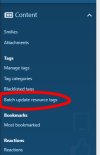 batch-update-resource-tags-menu.jpg
 -
 exclude-this-forum-from-tag-list.jpg
Overview Feature list Copyright info Releases (74) Reviews (1)
If you wish to purchase a license for this product, please register and then send a message to Stuart Wright to request access to purchase. Please include the URL of the forum you wish to use the product on.
Tag Essentials adds important (some would say essential) functionality to Xenforo's basic tagging system for threads and in XFRM resources.
This addon requires

 xenforo.com
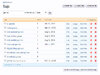
Admin Tag Management Page
xenforo.com
Admin Tag Management Page
Tag Essentials adds important (some would say essential) functionality to Xenforo's basic tagging system for threads and in XFRM resources.
This addon requires
Standard Library by Xon
A number of helper utilities designed to ease add-on development, does not have any direct user-facing changes. See README.md for additional details. Uploaded to the resource manager to aid dependency tracking and allow updating without updating...
xenforo.com
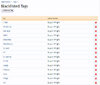
- Ability to create a list of blacklisted tags with a regex option.
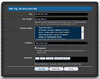
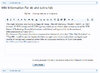
- Edit Wiki button added for each tag to open the wiki edit page.
- Merge button for each tag. Enter the tag to merge the current tag in to.
- Blacklist/delete tag buttons now update with Ajax so the page is not refreshed each time a tag is deleted or blacklisted. Very useful when managing tags on a specific page of the list. Deleting a tag used to refresh the page, reloading the list at the start. Now there is no page refresh saving a ton of time.
- Inline selection of tags to delete or blacklist. 'Select all' helps speed up the process.
- Dedicated page for managing blacklisted tags
- Ability to bulk import blacklisted tags
- Create a forum-view Tag Cloud Widget showing popular tags from threads in the current forum and its subforums.
- A new facility in the forum view to filter threads by the tags used
- Functionality to assign similar tags for a canonical tag. This will auto convert the similar tags to the canonical tag when one (or more) is used.
- When saving tags on the front end, do not error if they use a similar tag but automatically remove the “similar” tags and replace it with the canonical one.
- On the front end (utilising front end permissions), so that non-admins can edit the content, have a way to edit (supporting bbcode in the description) the tagline and description of the tag. Also change the front end so aside from showing the list of content that is using that tag, you see the tagline and description of the tag in addition to the list of content using the tag.
- Permission to manage tag wiki
- With permission, when viewing the tag page (thread tags | XenForo Community), there’ll be an “Edit” link to manage the tag description and tagline.
- Provides a tabbed interface to switch between the tag's recent content and the tag wiki description.
- When saving a new tag or an existing tag with empty Wiki information, get the Wiki information from Wikipedia.
- On install, update the tags which have empty Wiki info. Note: This may take some time if you have a lot of tags to fetch as we limit the frequency of Wikipedia API calls.
- Follow Wikipedia redirects (fixes cases where Wikipedia entries fail to load).
- If the wiki search returns a disambiguation page, there is an option to not use that.
- If the wiki search does not return an exact match, there is an option to try a fuzzy match.
- For when Wikipedia fails to return information for a tag, set the Wiki entry to the contents of the phrase "tagess_no_wikipedia_entry_exists" (default "No Wikipedia entry exists for this tag"). Note: if you do not want to display any text, set the phrase to a single space character to avoid attempting to repopulate it from Wikipedia each time it is saved.
- Batch update process to populate tags with wiki information if they are blank or contain the phrase above.
- * New in 2.4.0 : If the call to Wikipedia does not return a result, Tag Essentials will get information for the tag from ChatGPT if the option to do so is enabled.
- Use the tags as schema.org keywords to improve SEO.
- In the Batch Update Threads search form, you can now search for threads which have specific tags.
- When batch updating threads, you can now add or remove tags in addition to all the existing options. When adding a tag, the user that started the thread is credited.
- When creating a thread, after typing the thread title (when the title loses 'focus'), an ajax request will check to see if any tags are included in the title, if they are then they automatically get added to the tags list (they can be removed and more can also be added).
- Suggested tags can be single and multiple words. E.g. If these tags exist: "I love John", "John Paul George Ringo", "Paul George Ringo", "Ringo" and a new thread title is "I love John Paul George Ringo a lot" then all the tags will be suggested.
- Admin option to set the maximum number of words in a tag which will be auto suggested (default 3). This is to avoid too much processing when searching for tags within a title. If set to 3 words, the above example would not suggest the "John Paul George Ringo" tag as it contains 4 words.
- To combat slowness when the server is finding tags to suggest, there is an admin defined list of stop-words to prevent suggesting tags with common words. Use of the stop words list can be disabled, enabled to ignore tags only where the first word of the tag is in the list or enabled to ignore tags which contain any of the stop words.
- A default list is included. E.g. "A" and "I". If enabled, this would prevent the "I love John" tag from being suggested in the above example.
- The ability to get tags automatically added from ChatGPT when a thread is created. An Open API Key needs to be supplied from ChatGPT and if then enabled, and there are fewer than 3 (default, admin editable) tags already in the tag box, ChatGPT will attempt to top that number of tags up to 5 (default, admin editable) when the thread is created.
- Note that there will be a cost associated with using ChatGPT. This is currently working out to be less than $2 per month for AVForums.com (a busy forum) and MGEVs.com (not a particularly busy forum).
- A major new feature to auto tag new resources in the same way that threads are auto tagged.
- A batch update resources facility allow the batch update of resources from the resource titles
- Set a minimum number of tags to be required in new threads in a particular forum.
- Set default tags to be auto-suggested when a new thread is created in a particular forum.
- Exclude specific forum from tag lists (new in 2.5.5) does not show threads from particular forums in the tag pages.
- Set default tags to be auto-suggested when a new thread is created with a particular prefix.
- With permission (Tagess - Can Watch Tag), users are able to watch tags and receive an alert/email when new content is added with that tag.
- RSS feeds can be assigned tags that will be added to each thread created from that feed.
- There's been a new option for user criteria for user's that have used at least {x} tags. This can be useful for user promotions and trophies.
- When hovering a tag, you will get a preview popover that displays a snippet of the tag description (from the wiki info), with links to the "recent content", "top users", and "view information" pages. This can be styled differently by editing "tagess.css".
- Plenty of them
- Rebuild Caches -> Rebuild Empty Wiki Tags
- Rebuild Caches -> Prune low usage tags
- Rebuild Caches - > Remove orphaned tags (only usually needed to remove blacklisted tags after upgrading to 2.5.1.2)
- 4k uhd (ultra hd) | AVForums The tag overview page for their "4k uhd (ultra hd)" tag. Notice the synonyms, tagline and the tabs.
- 4k uhd (ultra hd) | AVForums - The page where the wiki information is displayed.
- 4k uhd (ultra hd) | AVForums - A list of users that have used the tag the most.
- Each license is valid for use on one Xenforo installation on one specified domain.
- Transfer to a different domain to that specified at the time of purchase is prohibited.
- This product will continue to be developed for the foreseeable future.
- There is no customer support on this product.
- 12 months license renewals are in place; when your license runs out you can continue to use the add on but will not be able to receive updates until you renew it.
